Microsoft PowerToys adds CursorHide, Button Lock mouse tools
At the forefront of the version 0.102 release are two notable additions to the PowerToys mouse utilities ecosystem: Mouse Button Lock and CursorHide. These features are tailored to reduce physical strain, improve navigation efficiency, and refine workflows across professional applications and casual use cases alike.
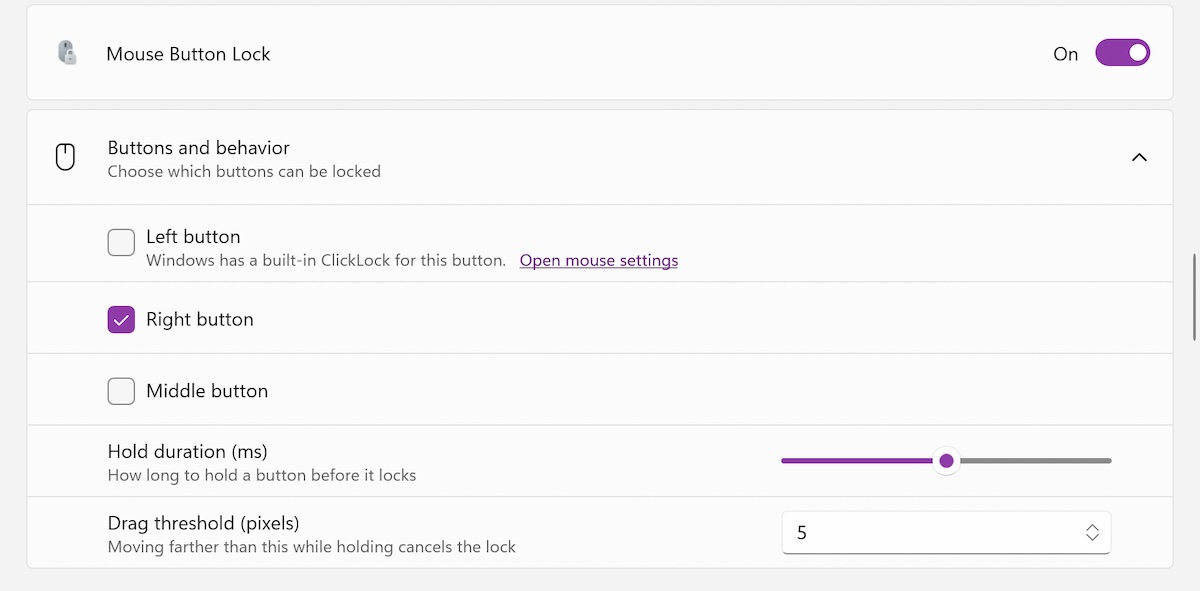
Mouse Button Lock is engineered to solve a common ergonomic and functional hurdle in computing—maintaining a pressed mouse button during extensive dragging, selecting, or gaming maneuvers. According to Microsoft Senior Product Manager Niels Laute, the utility allows users to press and hold a mouse button for a brief moment before releasing it. Once released, the Windows operating system continues to register the button as held down, enabling users to seamlessly drag items, highlight text, or navigate interfaces without keeping constant physical pressure on the hardware. The action persists until the user clicks any mouse button again to release the lock.
"This is especially useful for gaming, working in professional applications that require extensive dragging and selection, and improving accessibility for users who find it difficult to hold down a mouse button for extended periods," Laute explained in the official release announcement on the Windows Command Line blog.
The accessibility implications of Mouse Button Lock are substantial, offering relief to individuals experiencing repetitive strain injuries, fatigue, or motor difficulties that make prolonged clicking and dragging arduous. Simultaneously, professionals working in digital design, video editing, and complex file management systems will find the utility beneficial for handling multi-step interface operations without hand fatigue.
Complementing Mouse Button Lock is CursorHide, the second mouse-focused tool introduced in this iteration. CursorHide is designed to automatically conceal the mouse pointer whenever the user begins typing on the keyboard or when the mouse remains stationary for a designated period. By removing the cursor from view when it is not actively needed, the tool prevents visual clutter on the screen, ensuring an unobstructed view of text documents, code editors, and content consumption interfaces.
In addition to mouse enhancements, version 0.102 brings a major upgrade to the Command Palette quick launcher by introducing a customizable quick-access shelf. This feature allows users to pin up to nine frequently used commands directly beneath the main search box, providing immediate, single-keystroke execution for recurring tasks.
Users can enable and configure the quick-access shelf by navigating to Settings, selecting Appearance, and toggling Compact mode. Once active, the pinned commands can be executed instantly by pressing the Alt key combined with numbers one through nine. Alternatively, users can press Alt plus Shift and a corresponding number to select a command without executing it immediately, giving them granular control over their workflow shortcuts.
The latest PowerToys update also introduces a suite of new command-line tools that empower administrators and power users to script and automate PowerToys functions directly from the terminal. This integration allows for more advanced customization and system management, bridging the gap between graphical utility controls and command-line execution environments.
Further updates can be found within Keyboard Manager, which now features tap-alone remaps alongside a searchable key picker. These additions make it significantly easier to remap keys and create custom keyboard shortcuts tailored to specific professional and personal preferences. Furthermore, the popular ZoomIt utility has received a functional enhancement, gaining the ability to automatically add text to screenshots using integrated dictation capabilities, streamlining the process of annotating visual captures.
PowerToys version 0.102 is currently available for download via the project’s official GitHub repository, where users and developers can also review detailed release notes outlining every bug fix and underlying change included in the package.
The release of version 0.102 follows a series of iterative updates that have steadily expanded the utility suite over the past year. In January, Microsoft rolled out PowerToys version 0.97, which introduced CursorWrap—a specialized mouse utility built specifically for multi-monitor setups. CursorWrap allows the mouse pointer to teleport to the opposite edge of active displays, facilitating smoother navigation and cursor dragging across expansive multi-screen workstation layouts.
Months later, in August, Microsoft expanded the suite further with the introduction of Window Hopper. This tool was designed to mimic Alt-Plus-Tab style switching specifically for an individual application’s windows, enabling users to cycle through multiple open instances of the same program with greater speed and precision.
The modern incarnation of PowerToys traces its lineage back to the Windows 95 era, when Microsoft originally introduced the brand as a collection of small, freeware utilities conceived by internal developers as personal side projects. Abandoned for many years, Microsoft revived the concept in 2019 as an open-source utility pack tailored for Windows 10 and subsequent operating systems. Today, the project serves as a cornerstone for Windows customization, offering advanced functionalities that historically required third-party software installations, all while remaining freely accessible to the global developer and power user community.

Related News