The Best Third-Party Apps Showcasing Apple’s New Foldable iPhone Duo
The appeal of a foldable smartphone has always been straightforward: users want a device that remains pocketable and convenient for everyday carry, yet expands into a display large enough to comfortably enjoy books, magazines, immersive games, and productivity tasks without forcing the user to squint.
With the release of the Apple iPhone Duo, Apple has taken a massive leap into the foldable hardware market, introducing an innovative device that has immediately drawn widespread attention from mobile enthusiasts and industry analysts alike. Apple has done an exceptional job crafting the core user interface and meticulously optimizing its proprietary software suite to look stunning and function seamlessly on the Duo. However, as is often the case with entirely new form factors, the ultimate success of the device relies heavily on the ecosystem. It is up to third-party developers to bring their applications up to speed, designing versions that play nice with the Duo’s dual displays and take full advantage of the expansive screen real estate available on the inner panel.
The current software landscape for Apple’s foldable device is a mixture of progress and waiting. Many prominent applications—including major platforms from companies as large as Google—have yet to be fully redesigned to shine on the Duo. But among the developers who have embraced the challenge, a handful of creators truly stand out through exceptional design, high creativity, and thoughtful adaptation of the foldable hardware.

Evaluating these experiences requires keeping a few contextual notes in mind. Apple’s native applications have been skipped entirely for this assessment. While they look universally great, that level of polish is fully expected from the manufacturer, and every user who purchases the Duo receives those applications pre-installed anyway. Additionally, some of the hands-on impressions come from early beta versions of third-party apps that were shared in advance specifically for testing purposes. Consequently, daily experiences with the final versions of these apps on consumer hardware might vary slightly, hopefully leaning toward an even more refined final product.
Netflix
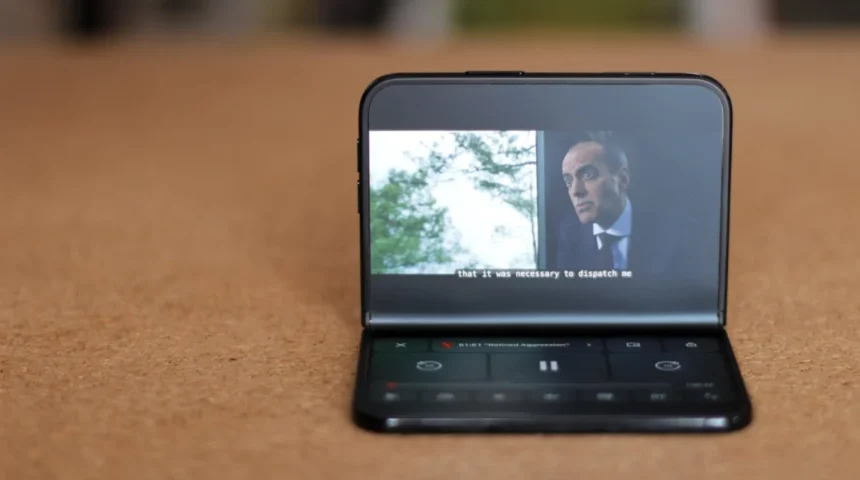
Among the first wave of major services to receive a complete, ground-up overhaul for the foldable display, Netflix has demonstrated an impressive commitment to Apple’s vision for the iPhone Duo. It is precisely the kind of application users will instinctively want to open when demonstrating the capabilities of their new foldable device to friends and colleagues.
Not only does the expanded inner display showcase a vast amount of visual content with striking clarity, but the application also introduces dynamic interface adjustments depending on how the device is folded, angled, and physically positioned. While not every layout trick will prove essential to daily viewing, video streaming platforms are natural companions for foldable hardware. Seeing a giant in the entertainment industry invest early in the format bodes well for the future of media consumption on the Duo.

Edits
Video editing on a standard smartphone has historically been a tedious, cramped affair, requiring creators to perform intricate timeline adjustments on tiny screens. On the iPhone Duo, however, editing videos using Instagram’s dedicated editing application, Edits, becomes a noticeably smoother and more intuitive experience.
Edits was among the first video platforms to receive a thorough optimization for the Duo, serving as a prime example of an app that genuinely benefits from additional screen space. Because video production naturally involves managing complex layers, transitions, and audio tracks, handling these technical details on a larger inner screen removes much of the friction traditionally associated with mobile content creation.
As a related observation, Instagram itself has also received a visual revamp for the Duo. However, given the platform’s deeply rooted vertical bias, it can occasionally look a bit unconventional when users hold the foldable device in a horizontal orientation. The layout is functional, but industry watchers anticipate that Instagram’s design team will likely continue tinkering with the interface to better harness the unique dimensions of the inner display.

RainViewer
Weather applications represent a category where developers have taken the hardware capabilities of the iPhone Duo very seriously, resulting in numerous pitches and software updates tailored to the new foldable layout. Among the weather mapping tools currently adapting to the hardware, RainViewer stands out with a remarkably clean and visually striking interface.
The application centers around an exceptionally detailed weather map designed to track incoming precipitation patterns with high visual fidelity. Other prominent weather software options have similarly updated their offerings to support the Duo’s unique layout, including Carrot Weather and Mercury Weather, both of which utilize the expanded display to present meteorological data with improved clarity and depth.
Deck-man
For users nostalgic for vintage audio hardware, Deck-man offers a playful homage by mimicking a classic analog Walkman directly on the iPhone Duo. The software utilizes a creative visual layout, featuring a catalog of cassette tapes on the left side of the display that users can virtually drag and drop onto the player interface on the right.

The application incorporates a clever physical interaction: playback does not actually initiate until the user physically folds the iPhone Duo closed, simulating the action of shutting a real-world cassette player. While this unique mechanic might feel slightly cumbersome for day-to-day music listening, it functions as a delightful novelty that simply cannot be replicated on a traditional, rigid smartphone. Individuals who grew up using physical media in the 1980s or earlier will likely find the experience charming, whereas younger users may greet the retro interface with curious confusion.
Headspace
Meditation and wellness applications have also found creative footing on the foldable form factor, proving that effective design does not require overly complex interfaces. Headspace serves as a strong example of how thoughtful visual scaling can enhance a wellness routine through simple graphics and smart layout choices.
Upon opening the application on the Duo for the first time, the transition of the smiling sun logo rising smoothly across the entirety of the expanded display provides an immediate, welcoming visual moment that demonstrates how subtle software adaptations can elevate the user experience.

Finalist
For daily organization, Finalist delivers a polished daily planner and journal combination that has been thoroughly optimized to look striking in any orientation. The application benefits directly from the physical characteristics of the iPhone Duo, particularly its matte inner display.
When the foldable device is laid flat on a desk running Finalist, the software transforms the hardware into a modern, beautifully themed physical notebook capable of tracking daily schedules, tasks, and meetings with a natural aesthetic.
MD Vinyl
Music listening on the Duo is further represented by MD Vinyl, an application that reimagines digital streaming libraries through the lens of classic analog record players. Instead of digital cover art lists, the software transforms tracks into virtual vinyl records.

To begin music playback, users must manually drag the stylus needle onto the rotating record. While purists may find the tactile interaction deeply satisfying, the software is entirely optional for enjoying music. Nevertheless, the Duo’s expansive inner display provides the ideal canvas for such visually driven software, making the overall experience far more engaging than it would be on a standard phone screen.
Side-by-Side Multitasking Mode
Beyond individual third-party applications, the iPhone Duo features a specialized side-by-side operating mode that allows users to run two distinct apps simultaneously in landscape orientation. This functionality immediately elevates even standard productivity tasks, turning ordinary workflows into efficient multitasking sessions.
For instance, a user participating in a video call can simultaneously pull up the weather application right next to the active video feed, managing information feeds smoothly on the fly. Furthermore, core productivity tools like email clients and calendar applications integrate so effectively in split-screen layouts that users can choose to maintain them in a persistent side-by-side arrangement for daily office tasks.

Related News