
The Rise of Local AI: How Open-Weight Models Are Bringing Powerful Intelligence Directly to Consumer Hardware

The gap between proprietary artificial intelligence models and open-weight alternatives continues to narrow dramatically, with open-source systems now trailing the industry’s leading closed models by only about four months on average. As this performance delta shrinks, a growing ecosystem of sophisticated AI architectures is becoming accessible to run locally on hardware that many users already own, fundamentally altering the economics and privacy dynamics of personal computing.
For years, utilizing a capable conversational assistant meant paying a recurring monthly subscription fee of around $20 and surrendering private conversations to third-party cloud servers. Today, however, open-weight models—where companies publicly publish the internal neural network weights and parameters learned during training—offer a compelling alternative. Free, user-friendly software packages such as Ollama and LM Studio have democratized this technology, allowing individuals to download, customize, and operate advanced AI models directly on their personal computers without ever transmitting data across the internet.
This shift carries profound implications for data privacy, cost reduction, and hardware utilization. With download sizes for models like Google’s Gemma 4 ranging from roughly 4.6GB to 20GB depending on the variant, setting up a local artificial intelligence assistant has transformed from an obscure technical hobby into a practical reality for everyday computer owners.
Why Run an AI Model on Your Own Machine
The primary catalyst driving users toward local AI deployment is data privacy. Cloud-based chatbots process every user prompt on remote corporate servers, raising complex security and confidentiality concerns. Recent legal developments have underscored these vulnerabilities, such as a court order requiring OpenAI to preserve historical ChatGPT logs, including previously deleted conversations, as highlighted in reviews of privacy-focused AI tools.
In contrast, operating an AI model locally ensures that all conversation data remains strictly confined to the host computer. Applications like LM Studio are architected to operate entirely offline, guaranteeing that both chat prompts and any attached documents never leave the user’s physical machine once the model files have been downloaded.

Beyond privacy, running models locally eliminates recurring subscription costs, shifting the financial investment entirely to hardware that users may already possess. Furthermore, the licensing frameworks governing these open models offer unprecedented freedom for modification and commercial use. DeepSeek’s R1 series, for instance, is distributed under the permissive MIT License, which explicitly permits commercial utilization, modifications, and derivative works. Similarly, Google’s Gemma 4 and OpenAI’s open-source gpt-oss models ship under the Apache 2.0 license.
Operating under open-source licenses allows developers and researchers to modify models to better suit specialized domains. A user requiring a model optimized strictly for medical applications can fine-tune or deploy a variant tailored specifically to that field, bypassing general-purpose restrictions. This high degree of customization and autonomy is fundamentally unavailable through standard commercial cloud subscriptions.
What Your Hardware Can Actually Run
Understanding whether a computer can handle a local AI model requires looking closely at parameters—the internal numerical values adjusted during the training process—and how they correspond to hardware memory constraints. A model must fit entirely within a graphics card’s video memory, commonly referred to as VRAM, or within the unified memory architecture found in modern Apple Silicon processors, which is shared dynamically between the central processing unit and the graphics chip.
As a general guideline, systems equipped with at least 8GB of VRAM can handle smaller or compressed models. However, more demanding applications and larger models require serious hardware investments, such as gaming GPUs featuring 24GB or more of VRAM, multi-GPU configurations, specialized enterprise AI racks, or high-capacity unified memory systems like the Mac Mini or the Nvidia DGX Spark.
To bridge the gap between massive neural networks and consumer hardware, developers rely on a technique known as quantization. This process shrinks model size by storing each weight using lower-precision data types, such as 8-bit integers rather than traditional 32-bit floating-point numbers. While quantization drastically reduces memory requirements, it introduces a minor trade-off in overall model accuracy.

System requirements vary by platform. LM Studio recommends a minimum of 16GB of RAM on Apple Silicon Macs running macOS 14 or newer, though 8GB models can manage smaller architectures. For Windows environments, the platform suggests at least 16GB of system RAM, 4GB of dedicated VRAM, and a processor supporting AVX2 instructions, while older Intel-based Macs are left unsupported.
Model scaling dictates memory consumption across the board. Ollama’s library lists the Gemma 4 26B variant requiring between 16GB and 19GB of memory, while the larger 31B version demands 19GB to 20GB. Meanwhile, OpenAI’s gpt-oss-20b requires approximately 16GB of memory, whereas its larger sibling, gpt-oss-120b, can execute efficiently within 80GB of memory capacity.
How to Set Up Ollama and LM Studio
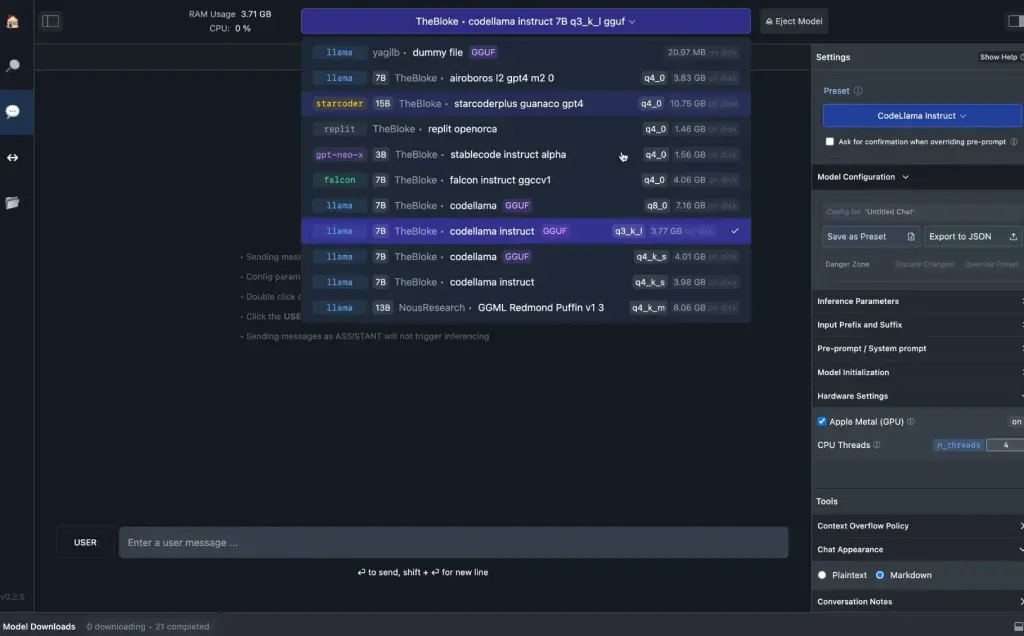
Deploying these systems locally is supported by two prominent software applications catering to different user preferences. LM Studio provides a polished graphical user interface well-suited for general users, featuring an integrated search mechanism connected directly to Hugging Face, the public hub for open-source machine learning models. Users can search for specific weights, download them inside the application, and immediately initiate a chat interface.
Ollama, conversely, is engineered primarily for developers and advanced users who prefer interacting through command-line interfaces. Installation on macOS and Linux is handled via a simple shell script execution, while Windows users can install the program through PowerShell commands provided on Ollama’s official download page.
Once installed, commands like pulling and running specific model versions via the terminal allow users to launch local chat sessions instantly. Additionally, Ollama establishes a local application programming interface, enabling other software applications on the host machine to communicate with the model seamlessly.
It is worth noting that certain models listed in repositories with cloud designations are designed to run remotely in cloud environments rather than locally. While these cloud-hosted options require no local hardware downloads and serve as viable alternatives for users needing heavier compute power, they operate under distinct privacy frameworks where API prompts are neither stored on provider servers nor utilized for subsequent model training.
Performance enhancements have also emerged to accelerate local execution without demanding upgraded hardware. Google’s Multi-Token Prediction drafters for Gemma 4, available on Ollama under the Apache 2.0 license, boost generation speeds by up to three times through speculative decoding. In this process, a smaller auxiliary model proposes several potential tokens in advance, which the larger primary model then evaluates and accepts in a single computational pass if accurate. Furthermore, local models are increasingly gaining advanced capabilities like web search and file access through Model Context Protocol servers, a feature recently integrated into platforms like LM Studio.
Where Local Models Still Lose to the Cloud
Despite rapid advancements, local deployment has inherent limitations when measured against massive cloud infrastructure. The four-month performance gap generally applies to the most capable open-weight models that fit within reasonable hardware footprints, but the industry’s absolute largest frontier models far exceed consumer capabilities. For instance, Alibaba’s Qwen3.8-Max boasts an astonishing 2.4 trillion total parameters, with 95 billion active at any given time—vastly eclipsing models like gpt-oss-120b, which operates within an 80GB memory ceiling.
When a model’s memory requirements exceed available VRAM and spill over into standard system RAM, processing speeds can drop significantly. Additionally, supporting larger context windows—the amount of reference text a model can analyze simultaneously—demands substantial memory resources. While smaller Gemma 4 variants offer a 128K-token context window, larger configurations expand this capacity to 256K tokens, placing a heavy burden on local hardware configurations.
Cloud-based AI services sidestep these hardware bottlenecks entirely, allowing frontier models to maintain a distinct advantage on the most complex reasoning evaluations and specialized tasks. Nevertheless, for users prioritizing strict data confidentiality, day-to-day text drafting, and offline operational autonomy, self-hosted local models offer a powerful and increasingly viable alternative to commercial cloud subscriptions.

Related News