
Apple Expands Audio Intelligence in Developer Betas, Sparking Debate Over "Always-Listening" AI Features
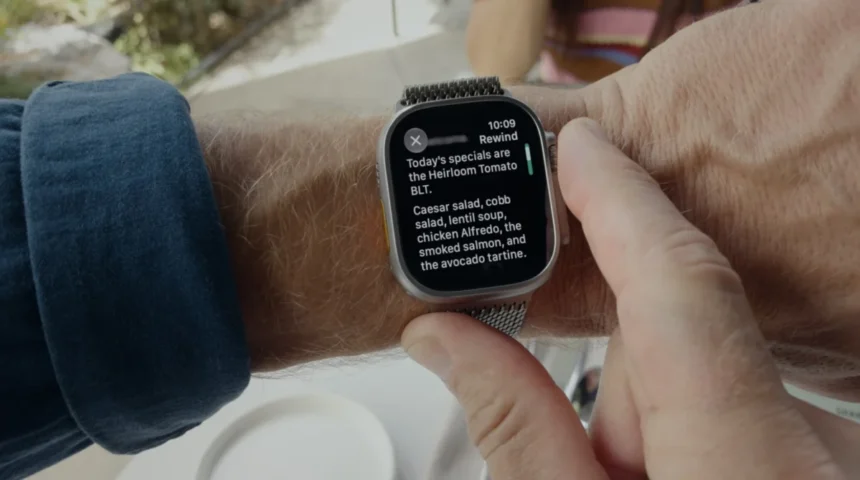
Apple has officially introduced a potentially controversial set of Audio Intelligence features into testing, rolling them out with the first developer beta versions of iOS 27.3 and watchOS 27.3. The newly released betas bring four distinct artificial intelligence capabilities designed specifically for Apple Watch Series 12 wearers. These tools allow users to detect important environmental sounds, identify unknown songs, catch up on missed conversations, and automatically take notes throughout their daily routines.
While the inclusion of these tools opens up exciting possibilities for hands-free productivity and accessibility, it also revives ongoing conversations about privacy, data boundaries, and the normalization of ambient listening technologies in consumer electronics.
After spending time testing Apple’s new Siri Recaps feature on the Apple Watch, the balance between utility and privacy becomes immediately apparent. The convenience and practical value of AI-powered audio recording and automated summarization can ultimately outweigh the initial discomfort or creepiness factor associated with a device constantly processing ambient audio. At the same time, real-world testing highlights areas where AI-assisted note-taking can overreach by capturing trivial details that are not worth retaining, demonstrating that the technology still has substantial room for refinement.
The newly introduced features are divided into two distinct categories based on their functional nature and privacy implications. The first two capabilities—sound and song detection—carry virtually no privacy concerns. Sound detection is engineered to recognize critical acoustic cues in the user’s environment, such as a smoke alarm, a car horn, or a doorbell, which serves as a vital tool for deaf and hard-of-hearing users navigating the physical world. Song detection utilizes integrated Shazam technology to identify playing music, a convenience that smartphone users have enjoyed for nearly two decades.

In contrast, the remaining two features—Live Rewind and Siri Recaps—have generated immediate scrutiny and concern. These tools actively record and subsequently transcribe or summarize conversations occurring with and around the Apple Watch owner. Live Rewind functions as a short-term buffer, enabling wearers to step back in time to review what was said in the preceding 15 seconds. Meanwhile, Siri Recaps compile audio summaries across the entire day, automatically extracting and saving notes on important statements and verbal interactions.
To address anticipated pushback regarding privacy, Apple has implemented strict safeguards. The company ensures that audio processing and AI model execution occur directly on the device whenever possible. Furthermore, the system is designed to avoid identifying individual speakers, refrains from storing raw audio files, and actively redacts sensitive private information such as government identification numbers or personal financial account details.
Despite these robust technical guardrails, many consumers remain uneasy about the broader cultural shift toward accepting that personal technology is perpetually listening to private and public spaces.
This tension creates a complex debate that resonates with many tech users who frequently lament the increasing pervasiveness of technology in daily life, yet simultaneously recognize the undeniable efficiency and utility built into Apple’s latest software ecosystem.
Practical evaluations of the features reveal specific operational dynamics. While Live Rewind addresses immediate conversational gaps, users may still default to traditional human responses—such as asking someone to repeat themselves—before relying on a smartwatch interface. However, tools like Siri Recaps quickly demonstrate their potential to become indispensable daily utilities for retaining critical logistical details.

Real-world scenarios underscore this practical value. When managing complex errands, such as dropping off a family vehicle for repairs and picking up a rental car, service providers often deliver a dense volume of verbal information regarding pricing structures, repair timelines, and institutional policies. Because these details frequently arrive too rapidly to pause and manually write down, reviewing Siri Recaps later in the day provides a reliable safety net, capturing essential data points like insurance deductibles, projected completion windows, and initial fuel levels in rental vehicles.
Yet, this automated approach also exposes operational flaws. During testing, Siri Recaps occasionally intermingled professional or logistical information with unrelated domestic chatter occurring later at home, such as planning evening errands or scheduling childcare appointments for the upcoming week. Ideally, such disparate topics should be segregated into distinct notes or organized under specialized headings rather than clumped into a single chronological stream.
Because the Recap feature can be configured to run continuously, it inevitably captures non-essential banter, such as casual discussions about television viewing plans or entertainment choices. This creates an abrupt reminder that the device is actively monitoring ordinary domestic life, a sensation that could easily cross into invasive territory if more sensitive subjects were being discussed. Consequently, users may feel compelled to manually pause or disable the Recap feature during private family dinners or intimate gatherings to prevent casual table conversation from being converted into automated digital notes.
While capturing a casual TV preference might be entertaining if exported directly to Apple’s Journal app for personal reflection, it serves little purpose in a logistical summary meant for productivity. Refining how the AI categorizes and segregates extraneous details will be crucial for long-term user satisfaction.
Future iterations of the software would benefit greatly from more intuitive editing controls. For instance, allowing a user to swipe left on a single irrelevant bullet point to remove it instantly from a Siri Recap—rather than forcing them to enter a dedicated edit mode, precisely position a cursor, and manually delete unwanted text—would streamline the cleanup process significantly.

Additional workflow improvements could include enhanced integration with other native applications. Providing an automated setting to export saved Siri Recaps directly into Apple’s Notes app, rather than requiring an extra manual step, would appeal to users who rely on Notes as the central repository for daily reminders and task lists. While maintaining this as an optional setting makes sense given the diverse ways individuals utilize the Notes application, a dedicated folder structure for automated recaps would greatly assist those seeking an integrated digital organization system.
Ultimately, while the initial realization that a wearable device is continuously listening can be unsettling, the tangible benefits of automated daily note-taking highlight a compelling direction for personal computing. As Apple continues to refine these features through the developer beta cycle, the evolution of Audio Intelligence will depend heavily on finding the right balance between comprehensive digital assistance and user comfort.

Related News