Apple Updates Spyware Threat Notifications as Security Experts Urge Caution and Professional Help
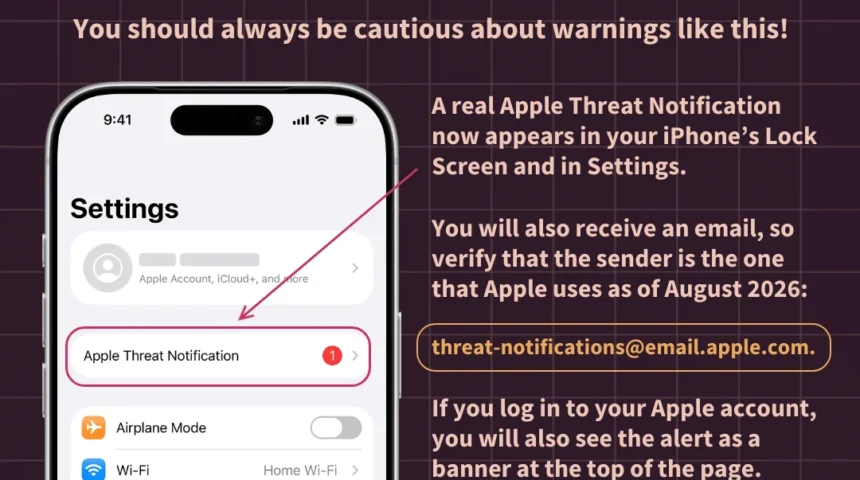
For over two decades, Apple has alerted device owners whenever state-backed surveillance tech targeted their digital spaces. Founded on transparency, the company’s alert system has evolved from traditional emails and iMessages to persistent banners within user accounts. Recently, however, Apple shifted its strategy to place these critical security alerts directly onto device lock screens and system settings pages, ensuring that high-risk targets can no longer miss the warning signs of sophisticated digital espionage.
This escalation in warning delivery arrives amid an escalating global conflict between commercial spyware vendors and the high-profile individuals—including journalists, human rights defenders, and political activists—who find themselves in the crosshairs. As mobile operating systems become harder to penetrate, the companies selling mercenary spyware have grown increasingly stealthy, prompting technology platforms to find more immediate ways to communicate potential danger to their users.
Understanding what these alerts signify, how professional investigators handle them, and what practical defenses exist can mean the difference between maintaining digital security and falling victim to targeted cyber attacks.
What an Apple Threat Notification Actually Tells You
When an Apple threat notification pops up on a locked phone or inside a settings menu, it carries a specific and alarming message. Put simply, the system has detected device-level activity signaling that the user has been targeted with mercenary spyware. This refers to the highly sophisticated, expensive commercial surveillance technology developed by private entities such as the NSO Group, Paragon, or Cytrox. These firms typically sell their capabilities exclusively to government clients and law enforcement agencies around the world.
Despite the severity of the warning, the notification itself comes with strict limitations. It does not confirm whether a spyware attack actually succeeded, nor does it reveal who might be orchestrating the intrusion or what their underlying motives happen to be. An alert is merely a signal that anomalous, targeted activity has occurred, meaning further technical analysis is required for a user to see a complete and accurate picture of their security status.
Confirming a Spyware Attack Through Forensic Investigation
Security experts frequently compare an Apple threat notification to a residential fire alarm. It successfully draws attention to the strong possibility of immediate danger, but it cannot extinguish the fire on its own. For anyone who receives an authentic Apple threat notification, the recommended course of action is to immediately seek expert support from trusted professionals or specialized organizations capable of conducting a comprehensive digital forensic investigation.
This process must be approached with caution. Because high-profile alerts attract widespread attention, malicious actors frequently deploy phishing scams and impersonation attempts designed to mimic official security warnings. Users must verify the authenticity of any message before clicking links or sharing device details.
For members of civil society, organizations like the non-profit Access Now offer specialized assistance through resources such as their Digital Security Helpline. Apple itself explicitly recommends that notified users enlist this kind of expert help, pointing to rapid-response emergency security assistance providers who understand the nuances of state-sponsored cyber operations.
The Role of Digital Forensic Investigations
When dealing with a suspected spyware attack, time is of the essence. Forensic investigators emphasize the critical importance of preserving evidence left behind on a device before routine system operations overwrite it. Every minute a compromised phone or laptop remains powered on increases the risk that valuable log data will vanish.
During an investigation, experts search system files, internal logs, and process histories for telltale traces of mercenary spyware. Data collection is carefully managed to minimize access to sensitive personal content, such as private photographs, personal contacts, and confidential communications. If technical traces are discovered, investigators contextualize these findings by mapping them against significant life events, such as international travel, sensitive professional work, confidential conversations, or periods of unusual device behavior.
Crucially, investigators note that many sophisticated spyware attacks leave behind no observable anomalies whatsoever. The complete absence of obvious signs does not guarantee that a device is safe. To validate their findings, professional investigators often submit their technical data to peer organizations for independent analysis, ensuring the highest possible accuracy before drawing conclusions.
The Limits of Detection and the Myth of the "Clean" Device
Even the most thorough digital forensic investigation may occasionally fail to uncover definitive evidence of a spyware infection. Skilled investigators understand their own limitations; they rarely issue a blanket statement guaranteeing that a user is fully safe. Spyware evolves rapidly and is intentionally engineered to erase or hide its tracks from standard detection methods.
This reality also applies to commercial consumer software. No single mobile application or security service can definitively diagnose, prevent, or mitigate every form of mercenary spyware. While users frequently encounter advertisements for apps that scan a phone and declare the device "clean," these tools are generally only confirming that the system lacks matches for a tiny, predetermined set of known threat indicators.
Relying on seemingly effortless software solutions can foster a dangerous sense of false security, leading users to neglect fundamental security hygiene. While certain security apps can be useful for flagging known malware or prompting system updates, they operate under the same strict operating system sandboxing restrictions as any other app. Consequently, they cannot inspect the deep system partitions where advanced spyware is often designed to hide. Furthermore, the leading mercenary spyware vendors routinely test their products against popular consumer detection tools before deployment to ensure they remain invisible.
Users must also exercise extreme caution when granting security applications deep access to their hardware. Authorizing an unknown app to examine system files provides the company behind the tool with a deeply detailed portrait of a user’s entire digital life. Unless an organization is thoroughly known and trusted, security experts advise against granting such permissions.
Navigating Digital Risks and Strengthening Everyday Defenses
For individuals facing increased digital threats, verifying the authenticity of an alert from Apple, WhatsApp, Facebook, or Google serves as the critical first step. Once verified, seeking expert help to conduct a forensic investigation helps determine the precise nature of the attack. Trusted technologists can assist in containing threats and restoring control over compromised accounts. In situations involving potential criminal cyber attacks, victims may consider reporting the incident to specialized authorities, though consulting with an attorney beforehand is strongly recommended to ensure personal safety.
Even if an immediate device inspection is impossible, users can preserve potential forensic evidence for future analysis by creating a complete backup of the affected hardware.
To reduce overall vulnerability, security advocates recommend adopting a series of baseline defensive practices. Installing system updates promptly and enabling high-security features—such as Apple’s Lockdown Mode, Google’s Advanced Protection on Android, or strict account privacy settings on messaging platforms—significantly raises the cost and difficulty for attackers. Minimizing one’s digital attack surface by separating personal and professional devices and reducing the total number of installed applications also limits exposure.
Ultimately, digital security is not a permanent state that a user can achieve once, but an ongoing practice that requires constant vigilance. Because every individual possesses a unique threat profile, personalized assessments and continuous awareness remain essential tools for navigating an increasingly complex threat landscape.

Related News