Windows 11 KB5127936 update released with 41 changes and fixes
As part of Microsoft’s established release cycle, KB5127936 serves as an optional preview update deployed toward the end of the month. These preview releases provide a valuable window for IT administrators and enthusiastic users to test out new features, user interface tweaks, and system-level fixes before they are formally integrated into the broader user base during the upcoming Patch Tuesday rollout.
Unlike the mandatory cumulative updates that arrive on Patch Tuesday, monthly preview updates are entirely optional and notably exclude security patches. This design allows organizations and individual users to evaluate non-security improvements and interface adjustments in a controlled manner without immediately altering their production security baselines.
The October 2026 preview update brings notable enhancements to core Windows components, beginning with the File Explorer. Following the installation of KB5127936, the File Explorer context menu operates with improved speed and offers expanded customization options. Users can now exercise finer control over which application extensions and commands appear within the menu, as well as how those items are organized, streamlining daily file management workflows.
Another major addition included in the KB5127936 update is an enhanced Cloud rebuild capability. Historically, recovering an unbootable Windows installation often required specialized physical media, such as a USB flash drive, or a pre-configured custom system image. With this new update, the Cloud rebuild feature allows the operating system to reinstall Windows using a clean image and necessary drivers downloaded directly from Windows Update. Crucially, this recovery mechanism functions even in scenarios where the operating system has failed to start normally, offering a streamlined troubleshooting path for both consumers and IT support staff.
Gamers and power users will also notice updates tailored to the system’s Xbox mode. Microsoft has refreshed the Gaming Task View, introducing a new navigation bar that grants quick access to essential system actions. While immersed in gaming sessions, players can now easily manage Power Options or quickly exit to the desktop without navigating away through traditional multi-step menus.
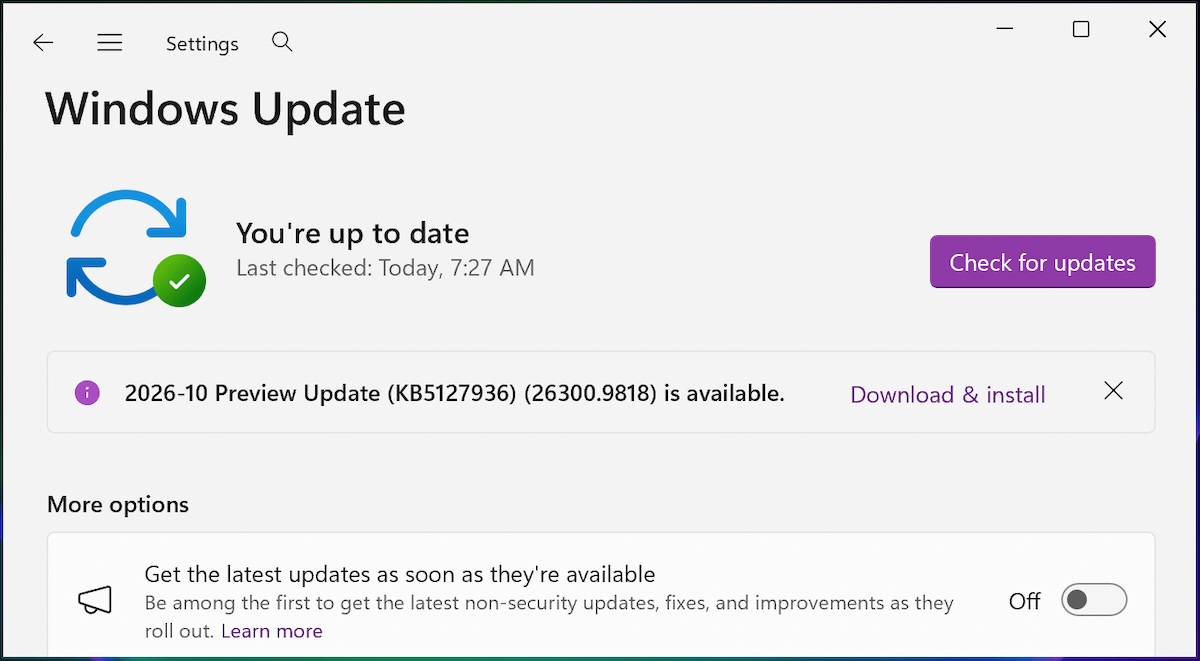
Deploying the update is straightforward for those who wish to test the new features early. The KB5127936 preview update can be manually obtained by downloading the package directly from the Microsoft Update Catalog. Alternatively, users can check for the update through the native operating system interface by opening the Settings application, navigating to Windows Update, and selecting the check for updates option. Because this is an optional release, users who have not enabled the setting to automatically receive the latest updates as soon as they are available will need to manually click the download and install link to initiate the process.
Windows 11 KB5127936 highlights
Once successfully installed, this optional non-security update will advance Windows 11 25H2 and 26H2 devices to builds 26200.9818 and 26300.9818, respectively. The October 2026 preview package weaves in a wide array of underlying adjustments designed to polish overall system reliability and responsiveness across supported hardware configurations.
Alongside the immediate feature rollout, Microsoft has been actively reminding users and enterprise administrators about important infrastructure updates running in the background. Specifically, updated Secure Boot certificates are currently rolling out to replace the original 2011 certificates, which are scheduled to reach their official expiration date in late June 2027.
Microsoft originally outlined plans to refresh these expiring Secure Boot certificates on eligible Windows 11 systems earlier in the year. These announcements followed formal warnings issued to users and IT professionals to ensure that certificates were properly updated well ahead of their expiration.
As part of this ongoing cryptographic transition, Microsoft has issued a technical advisory warning customers that they may encounter an additional system restart following the installation of the October 2026 optional update, as well as similar updates scheduled for release over the next several months.
In an official message center update, Microsoft explained that a limited number of consumer and business devices might experience one additional restart during the installation phase. This one-time restart happens automatically after a Secure Boot certificate update is successfully applied as a standard part of the broader Secure Boot update lifecycle, ensuring that the system firmware and operating system remain synchronized and secure moving forward.

Related News